sábado, abril 24, 2010

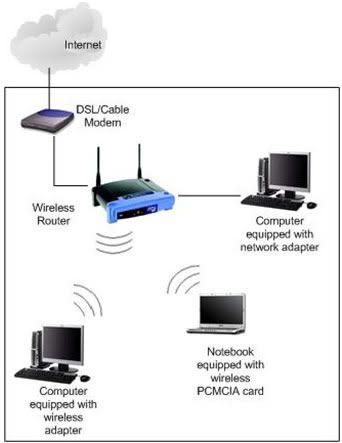
Servicios y Dispositivos WiFi del "Combo Básico DePapaya".


Servicios y Dispositivos WiFi del "Combo Básico DePapaya" para Residencias, Oficinas y Locales Comerciales.


COPYRIGHT © 2010 DePapaya.com
info@depapaya.com
  • Showroom: Super Outlet La80, Carrera 80 #13A-261 (57)(2) 313-0405 (314)671-1740
  • Oficina: Avenida 6N #26N-58 (57)(2) 524-5711 (310) 427-4062
CALI - COLOMBIA

La historia de Internet en 8 minutos. (Subtítulos en español).

Abril 23, 2010.
La historia de Internet en 8 minutos. (Subtítulos en español).
Por el usuario voolive en You Tube.
Subido en Abril 20, 2009

""Historia de la Internet" es un documental animado que resume en ocho minutos como se inició una de las herramientas más utilizadas en el mundo, Internet. Este corto forma parte del trabajo final de Melih Bilgil en su Diploma en Diseño Gráfico de la Universidad de Ciencias Aplicadas de Mainz"


COPYRIGHT © 2010 DePapaya.com
All rights reserved.

miércoles, abril 14, 2010

Invitación a visitar el grupo facebook : DePapaya.com


COPYRIGHT © 2010 DePapaya.com
Reproduction in whole or in part, without written permission is prohibited.
All rights reserved.

domingo, abril 11, 2010

Cómo puede aumentarse el alcance de una red WiFi?

April 11 de 2010
How Can the Range of a WiFi Network Be Boosted?
By Bradley Mitchell, About.com Guide

Question: How Can the Range of a WiFi Network Be Boosted?


WiFi at home

Answer:

You can boost the signal range of a WiFi computer network in several ways:

  1. Reposition your router (or access point) to avoid obstructions and radio interference. Both reduce the range of WiFi network equipment. Common sources of interference in residences include brick or plaster walls, microwave ovens, and cordless phones. Additionally, consider changing the WiFi channel number on your equipment to avoid interference.
  2. Upgrade the antenna on your router(or access point). WiFi antennas on most wireless base stations can be removed and replaced with more powerful ones.
  3. Add another access point (or router). Large residences typically require no more than two APs, whereas businesses may employ dozens of APs. In a home, this option requires connecting your primary wireless router (access point) to the second one with Ethernet cable; home wireless routers and/or APs don't normally communicate with each other directly.
  4. Add a bi-directional WiFi signal amplifier to wireless devices as needed. A WiFi signal amplifier (sometimes called "signal booster") attaches to a router, access point or Wi-Fi client at the place where the antenna connects. Bi-directional antennas amplify the wireless signal in both transmit and receive directions. These should be used as WiFi transmissions are two-way radio communications.
  5. Add a WiFi repeater. A wireless repeater is a stand-alone unit positioned within range of a wireless router (access point). Repeaters (sometimes called "range expanders") serve as a two-way relay station for WiFi signals. Clients too far away from the original router / AP can instead associate with the WLAN through the repeater.

See More About:

Suggested Reading

Related Resources

Related Articles

©2010 About, Inc.,
Compute Section. All rights reserved.

COPYRIGHT © 2010 DePapaya.com
Reproduction in whole or in part, without written permission is prohibited.
All rights reserved.