sábado, abril 24, 2010

La historia de Internet en 8 minutos. (Subtítulos en español).

Abril 23, 2010.
La historia de Internet en 8 minutos. (Subtítulos en español).
Por el usuario voolive en You Tube.
Subido en Abril 20, 2009

""Historia de la Internet" es un documental animado que resume en ocho minutos como se inició una de las herramientas más utilizadas en el mundo, Internet. Este corto forma parte del trabajo final de Melih Bilgil en su Diploma en Diseño Gráfico de la Universidad de Ciencias Aplicadas de Mainz"


COPYRIGHT © 2010 DePapaya.com
All rights reserved.

miércoles, abril 14, 2010

Invitación a visitar el grupo facebook : DePapaya.com


COPYRIGHT © 2010 DePapaya.com
Reproduction in whole or in part, without written permission is prohibited.
All rights reserved.

domingo, abril 11, 2010

Cómo puede aumentarse el alcance de una red WiFi?

April 11 de 2010
How Can the Range of a WiFi Network Be Boosted?
By Bradley Mitchell, About.com Guide

Question: How Can the Range of a WiFi Network Be Boosted?


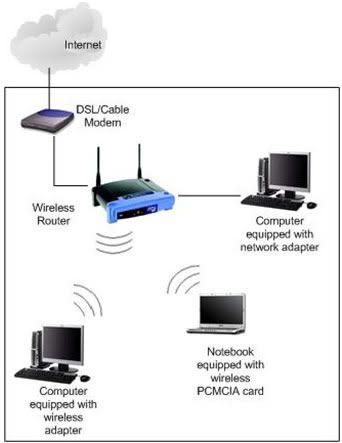
WiFi at home

Answer:

You can boost the signal range of a WiFi computer network in several ways:

  1. Reposition your router (or access point) to avoid obstructions and radio interference. Both reduce the range of WiFi network equipment. Common sources of interference in residences include brick or plaster walls, microwave ovens, and cordless phones. Additionally, consider changing the WiFi channel number on your equipment to avoid interference.
  2. Upgrade the antenna on your router(or access point). WiFi antennas on most wireless base stations can be removed and replaced with more powerful ones.
  3. Add another access point (or router). Large residences typically require no more than two APs, whereas businesses may employ dozens of APs. In a home, this option requires connecting your primary wireless router (access point) to the second one with Ethernet cable; home wireless routers and/or APs don't normally communicate with each other directly.
  4. Add a bi-directional WiFi signal amplifier to wireless devices as needed. A WiFi signal amplifier (sometimes called "signal booster") attaches to a router, access point or Wi-Fi client at the place where the antenna connects. Bi-directional antennas amplify the wireless signal in both transmit and receive directions. These should be used as WiFi transmissions are two-way radio communications.
  5. Add a WiFi repeater. A wireless repeater is a stand-alone unit positioned within range of a wireless router (access point). Repeaters (sometimes called "range expanders") serve as a two-way relay station for WiFi signals. Clients too far away from the original router / AP can instead associate with the WLAN through the repeater.

See More About:

Suggested Reading

Related Resources

Related Articles

©2010 About, Inc.,
Compute Section. All rights reserved.

COPYRIGHT © 2010 DePapaya.com
Reproduction in whole or in part, without written permission is prohibited.
All rights reserved.

Aumentando una señal WiFi.


June 03, 2009.
Boosting a WiFi Signal
Michael Phillips

Dear Michael,
I wondered if you could help with our broadband connection requirements.
We currently have BT Broadband, using the router which was provided by BT. This is located in a second floor office, separate from the house.
Although the router is only a few yards away from the house, internet connection in the house is either poor or non existent, depending on the time of day. We have purchased a "booster" located in the house but to no avail.
We have another workshop around 80m away from the office where we would also like to receive an internet connection. However with our current set up this is simply unachievable. We are in a fairly rural location and there are trees in-between the connection route to the workshop.
Any suggestions would be most appreciated.
Kate


Our Broadband Expert says...

Hi Kate, the router supplied alongside your BT broadband (www.bt.com) home hub service is not quite up to the job.

The amplifying range of the BT wireless router supplied with your service (typically a BT Voyager 2110 at the present time) is, according to BT technical advice, 50 metres indoors and 250 metres outdoors.

However, these figures represent the best range you could receive in ideal conditions. So how might you go about boosting your signal?

Boosting a Wireless Connection

In order to ramp up your wireless connection, take the following courses of action:

  1. Swap your router for a more powerful model: The tech team at Broadband Choices recommend most routers made by Linksys, Netgear, Planet and Belkin. Additionally, a router that does the new, faster draft N (802.11n) would be both preferable and future proof. On top of these suggestions, PC Pro Magazine favours the D-Link DIR-655 for long range and rural use. Although relatively expensive in relation to standard wireless routers, I found one of these on Amazon Marketplace for £76.
  2. Consider purchasing a booster: A good quality booster (such as the Hawking Technologies booster) can increase the output power of a wireless signal by up to 600%. Signal boosters capture stronger signals from the outside wireless network and amplify the signal inside your network, thus improving your wireless coverage. It's that simple.
  3. Position your router wisely: The best position for your wireless router is either high or low, and away for any walls, metal, appliances or copper pipes. Attics and lofts are popular locations for the positioning of wireless routers. For some households, the attic is an inappropriate location for the router due to severe heat or lack of access. In these cases, a high shelf or bookcase would make a canny substitute. Try placing your router in a convenient place first and take it from there.
  4. Replace your antenna: If your router is near an outside wall, half of the wireless signals will be sent outside your home, and much of your router's power will be wasted. Some router manufacturers sell external omnidirectional antennas that are significanly stronger than the routers built in antenna. Upgrade to a hi-gain antenna that focuses the wireless signals only one direction.
  5. Add a Wireless Repeater: Wireless repeaters extend your wireless network range without requiring you to add any extra wiring. They additionally offer an easy way to increase the effective coverage of your wireless network. A wireless repeater will bounce signals, which may not have had the density to reach the destination device of their own accord, to remote wireless devices.
  6. Change Your Wireless Channel: Wireless routers can broadcast across a number of different channels, similar to the way radio stations use a variety of channels. Try altering your wireless router's channel through its configuration page to see if your signal gets stronger. You don't need to change your computer's configuration, because it'll automatically detect the new channel.
  7. Group your brands: While routers and network adapters from different manufacturers should work in harmony with each other, you often get better performance if you pick a router and network adapter from the same supplier. Consider choosing all your hardware from the same brand, in some cases performance can be radically improved should you adopt this approach.

Upgrade:

If you're using an 802.11b wireless network and you're unhappy with the performance, consider replacing your router and network adapters with 802.11g-compatible equipment. BT Broadband supports both of these systems. Further information on these differing wireless networks can be gleaned from here .

Wireless Routers and Rural Locations

There are two main reasons as to why living in rural areas will have a negative impact on the strength of your wireless signal:

  • Trees and Buildings: The more walls, trees, terrain or structures between your two antenna points, the weaker the signal will be.
  • The Broadband Speed Divide: A disparity exists between the quality of broadband service in town and country, with Londoners enjoying speeds that are, on average, twice as fast than those experienced in Northern Ireland and Wales. Therefore, a perfectly configured, top of the range wireless router could be let down by a rural connection that fails to deliver maximum speeds. Who needs the speed, city dwellers or country cousins?

Future Tech

While most other telecoms companies are focussing on the development of mobile broadband products, our friends at Intel are still diligently trying to push WiFi connectivity as far as it can go.

Intel's 'Rural Connectivity Platform' will reportedly have the capacity to beam WiFi signals from one antenna to another located more than 60 miles away, and at data rates up to 6.5Mbps.

This technology will be introduced to the Indian market in autumn 2008 and the rest of the world early next year.

Additional Phone Lines – A Last Resort

Should you have no luck having taken the steps outlined above, you may want to consider installing an additional phone line in the second workshop. Here are the most economical combinations with which you might achieve this:

  • Additional phone line with BT (£124.99 for installation, plus an extra £11.75 a month for line rental)
  • Additional phone line with Madasafish (www.madasafish.com) (£115 for installation, plus an extra £9.99 a month for line rental)
  • Additional phone line with Sky (www.sky.com) is free (with a £30 connection fee if you are a new Sky digital customer)


Open article at broadbandchoices.co.uk


COPYRIGHT © 2009 DePapaya.com
Reproduction in whole or in part, without written permission is prohibited.
All rights reserved.

lunes, abril 05, 2010

El colapso en la Web de los Modelos de Negocio, actualmente vigentes, en el campo de contenidos.


Technology.
Why Ancient Mayans and Media Barons Are Alike.
By By Mathew Ingram of GIGAOM
Published: April 3, 2010


Chichen Itza

Clay Shirky doesn't write a lot — he's averaged about one post every two months over the past year — but when he does write something, it's usually well worth reading. His latest looks at what the media theorist calls "The Collapse of Complex Business Models."

In a nutshell, Shirky draws a comparison between the theories of anthropologist Joseph Tainter — who wrote about why ancient societies such as the Romans or the Mayans suddenly collapsed, despite having achieved high levels of sophistication — and the current state of the mainstream media. Need a hint? It's not good.

I always thought that the collapse of the ancient Mayan civilization had something to do with inventing basketball, but it's possible that I'm confused about that. In any case, Tainter's theory is that most of these civilizations collapsed not in spite of their sophistication and complexity but because of it.

As Shirky describes it:

"When societies fail to respond to reduced circumstances through orderly downsizing, it isn't because they don't want to, it's because they can't. In such systems, there is no way to make things a little bit simpler – the whole edifice becomes a huge, interlocking system not readily amenable to change."

The comparison between these societies and modern media giants is obvious: both are large, sophisticated and complex — and incapable of behaving in any other way.

So when media leaders such as Barry Diller, Steven Brill and Rupert Murdoch say that readers and viewers will have to pay them for their content, Shirky says, what they really mean is:

"Web users will have to pay for what they watch and use, or else we will have to stop making content in the costly and complex way we have grown accustomed to making it. And we don't know how to do that."

Related

By Clay Shirky.
Thursday, April 1st, 2010 at 12:50 pm
Go to Clay Shirky´s Blog
"If you're going to read one thing this long holiday weekend, don't waste your time on yet another iPad story. Head over to Clay Shirky's blog instead and read his great new piece titled The Collapse of Complex Business Models. It's all about the transformation of media in the age of Everybody,and it's focusing on a subject very dear to our heart – oldteevee vs. newteevee."
Janko Roettgers
at newteeve.com

Some might take issue with Shirky drawing a comparison between an entire civilization and a specific industry like the media, but I think his point is well taken — regardless of whether it is sociologically proper — because it focuses on the one thing that has kept traditional media entities from adapting more quickly.

Although I've argued that having the desire to change is one of the most fundamental things required for successful adaptation by media entities, the reality is that the single biggest barrier to doing so is the sheer size of most media organizations, and the bureaucratic inertia that comes with that — as was eloquently expressed yesterday in this tweet from Patrick Laforge of the New York Times.

Suggesting that the New York Times or the Washington Post — or any other traditional media outlet — should suddenly transform itself into an online-focused or web-first publication is a little like telling Wal-Mart that it should transform itself into Craigslist, or telling a plesiosaur to hurry up and grow legs already.

There may be no way to get there from here. The obvious implication is that the Christian Science Monitor and the Seattle Post-Intelligencer may have taken the only functional approach to the problem: namely, shut down print altogether and become web-only. As Marc Andreessen put it recently, more media entities may need to burn the boats.


Post and thumbnail photos courtesy of Flickr user KM&G Morris
Copyright 2010 GigaOm. All Rights Reserved.
GigaOmis an independent blog network.


COPYRIGHT © 2010 DePapaya.com
Reproduction in whole or in part, without written permission is prohibited.
All rights reserved.